Organizations and billing
Billing, quotas and membership hang off an organization. Inside it, projects separate environments such as production, staging or a client, and each node belongs to one.
org list prints your organization profile, current plan and quota
status. Enrol a node into a specific project with
safegrd enroll --project <id-or-slug>; without it the
organization's default project is used. With a credential that can see more than one
organization, name it with --org.
Signing in
| Command | When |
|---|---|
| safegrd login | Interactive. Opens a browser to confirm the session. --no-browser prints the URL instead. |
| safegrd login --token sg_pat_... | CI and headless hosts. A personal access token, non-interactive. |
| safegrd enroll --token ... | Registering a host rather than a person. A node token is scoped to one node and re-enrols only that node; a personal access token registers a new one. |
| safegrd enroll --api-key ... | An organization key, for provisioning many hosts from an image or a configuration manager. |
Tokens are issued and revoked in the console under Tokens.
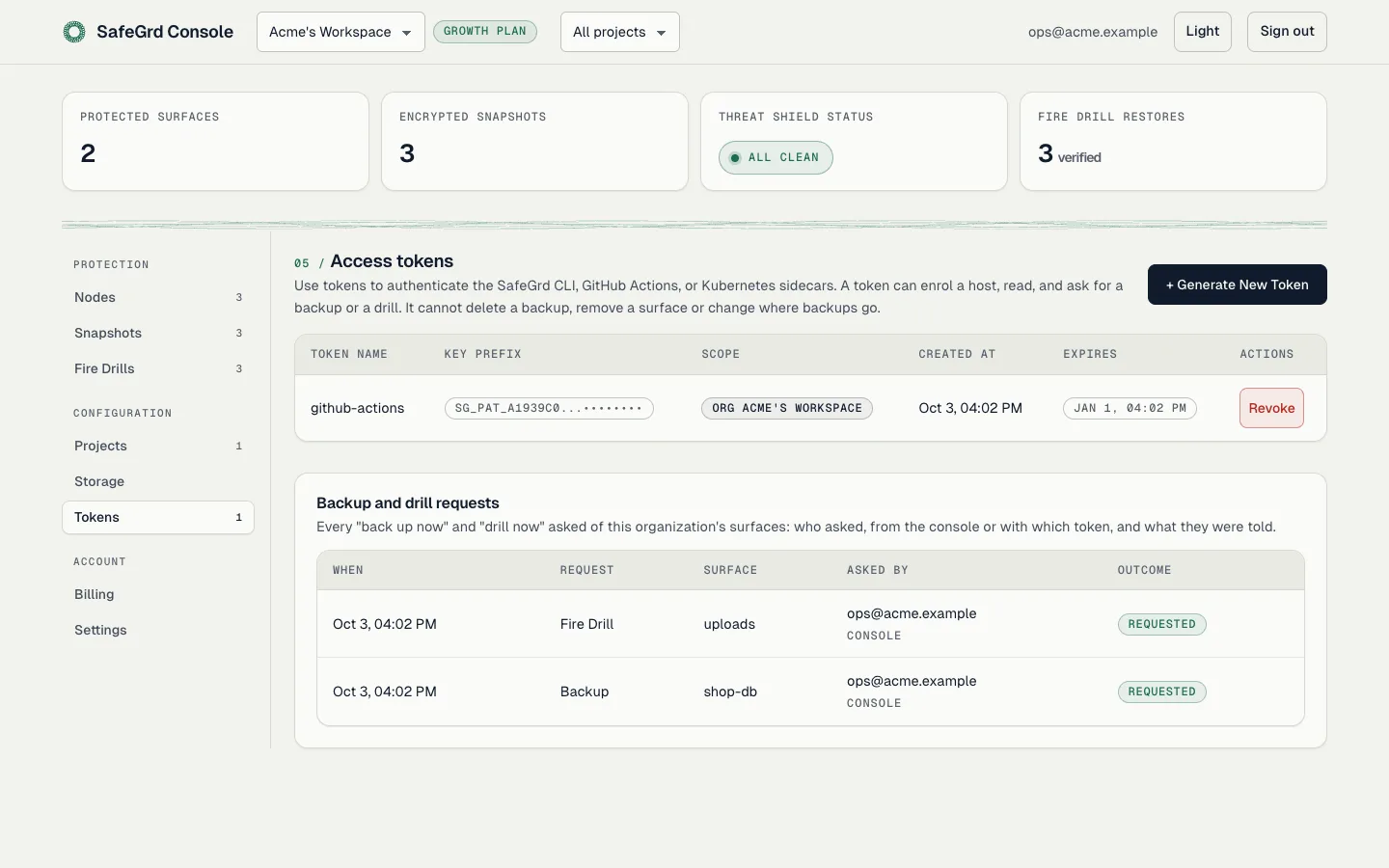
Creating a token, or authorizing safegrd login in the browser, requires
re-entering your password to prevent unauthorized generation from an active session.
Tokens created in the console also trigger an email notification; if you receive an alert
for a token you did not create, revoke it immediately and update your password.
Two-factor sign-in
Turn it on under Settings, in Two-factor sign-in:
- Enter your password.
- Scan the QR code with an authenticator app (1Password, Google Authenticator, Authy or similar), or type the key it shows.
- Enter the 6-digit code the app shows.
- Save the ten recovery codes. They are shown once, and each signs you in once if you lose the app. New recovery codes replaces the set.
Turning it on signs out every other session. From then on, sign-in asks for a code after the password, and the console asks for one again before deleting anything, cancelling a subscription or changing an organization's sign-in rules. One code covers those actions for five minutes. After five codes in one minute, the next has to wait a minute. A password reset does not turn two-factor off.
When you enter a code at sign-in, you can tick Remember this browser for 30 days. For 30 days that browser asks only for the password or the provider. Signing out keeps it remembered, so leave the box unticked on a shared computer. A password reset, signing out everywhere, or turning two-factor off or on again makes every browser ask for the code again. Deleting and the other confirmed actions still ask for a code.
An owner or admin who has two-factor on can require it of every member of the organization, in the same card. A member who has not set it up is taken to the setup step at sign-in and can do nothing else in the console until they finish. While the rule stands, members cannot turn two-factor off. Ask for a code at every sign-in turns off remembered browsers for the organization's members, including browsers they already chose to remember. Personal access tokens and node tokens are never asked for a code, so the CLI and enrolled hosts keep working when the rule is turned on.
Google and GitHub
Where the server has them configured, the sign-in and sign-up pages offer Google and GitHub. Only an address the provider has verified is accepted (for GitHub, the primary address).
- An address SafeGrd already has an account for signs in to that account, and links the provider to it. Later sign-ins follow the link even if the address at the provider changes.
- An address SafeGrd has never seen gets a new account, with its own organization, as a sign-up would. The account has no password.
- An address that was invited to an organization but never set a password cannot sign in this way. Accept the invite and set a password first.
An account without a password confirms sensitive actions (creating a token, authorizing
safegrd login, turning two-factor on or off) by signing in with its provider
again: a provider sign-in in the last 10 minutes stands in for the password. To add a password,
use Forgot password on the sign-in page; after that, the
password and the provider both sign in.
Two-factor still applies: with it on, a provider sign-in asks for a code too. An owner or admin can require that members sign in with Google, or with GitHub, under Two-factor sign-in in Settings. They have to be signed in that way to set the rule. Password sign-in then stops working for members of that organization, and a session signed in another way is sent back to sign in. Personal access tokens and node tokens are not affected.
Expiry and scope
A new personal access token expires after 90 days, and the console displays the date with a warning two weeks in advance. You can set a shorter lifetime when creating a token, but tokens cannot be set to never expire. Tokens created before this policy remain valid without an expiration date so existing workflows are not interrupted.
Tokens can also be scoped to a single organization or project, restricting access regardless of your broader account permissions. Scoping a token to a host's specific project limits the impact if credentials are ever compromised.
Plans and quotas
Plan limits and quotas are managed centrally on the server and reflected across the console.
For current tiers, features, and pricing details, refer to the pricing page
or the /api/v1/plans endpoint.
Paid plans differ by how often they prove a restore and by what they unlock. The one thing a plan meters is hosted storage: the bytes SafeGrd keeps locked for you. Paid plans do not count surfaces (a database, a file tree or a mailbox) or team members, and every paid plan backs up hourly. The free plan is for one person and one surface, backed up daily to hosted storage. Backups to your own bucket are never metered.
The trial, and the free floor
The 14-day trial runs Growth’s Fire Drills. If a trial ends without an active subscription, the organization moves to the free plan.
The free plan keeps encrypted, locked backups of one surface and runs a Fire Drill on it once a month, in memory. An organization without a paid plan (an expired trial, a paused or cancelled subscription) is on the free plan.
What lapsing does not do
A billing failure never stops a backup.
A lapsed organization keeps every surface it already had and keeps backing them up, and everyone already in it keeps their access. Only new surfaces and new team members are blocked. Snapshots in your own bucket stay there, under your Object Lock, whatever happens to the subscription or to SafeGrd. With a customer-managed key your key reads them without SafeGrd.
A plan changes only when the payment provider's signed webhook arrives, not when the checkout page returns.
The owner
The account that created an organization owns it. Ownership cannot be handed to another member yet, and an account owns one organization: after deleting it, the same account cannot create another.
Invoices and the card on file
The owner sees, under Billing, the card renewals are charged to and every invoice, with a PDF to download. Update opens the payment provider's form to replace the card. The payment provider issues no PDF for a $0 invoice, and sends a receipt by email for each charge.
Deleting an organization
- On hosted storage, copy the backups you want to keep with
safegrd export: once the organization is deleted they cannot be downloaded. - Decommission every host under Nodes, and cancel the subscription under Billing. Delete is refused until both are done, and says which is left.
- Under Settings, choose Delete organization and type its name.
The organization leaves SafeGrd at once and you are signed out. Backups already written stay in their storage. We keep the organization's records for 12 months so it can be restored, then erase them. To have them erased sooner, write to support@safegrd.dev, and we erase them within 30 days (Privacy Notice).